
- What is the Google Books API Import Feature?
- Requirements
- Available Import Sources
- How to Import Books via Google Books API - Step by Step
- Test an ISBN in Browser
- Common Problems and Solutions
- Best Practices for Large Catalog Imports
- Frequently Asked Questions
- Related Documentation
- Related Blog Articles
- Need Help?
- ▶ Auto-playing demo
What is the Google Books API Import Feature? #
Manually entering book details one by one is slow and error-prone. The Books Gallery Google Books API import feature lets you add complete book data – title, author, cover image, description, publisher, and more – using just an ISBN number. This guide shows you exactly how to import books via Google Books API in under 5 minutes.
The Books Gallery plugin connects directly to the Google Books Archive or Open Library, letting you import complete book data in seconds using just an ISBN number. This powerful WordPress digital library plugin feature is a major time-saver for anyone managing a large collection. Simply enter one or multiple ISBN numbers separated by commas and the importer instantly pulls in everything you need.
What gets imported automatically:
Book title, author name, cover image, description, publisher, publication date, ISBN, page count, language, reading age, and book format – all in seconds using just the ISBN number.
Requirements #
- Books Gallery Premium plan – Google Books API import requires an active premium license
- A Google Books API key – free to create, required for Google Books source only
- Open Library import is available without an API key
Available Import Sources #
| Source | Requires API Key? | Best for |
| Google Books | Yes – free Google API key required | Most books – largest database |
| Open Library | No – works immediately | Classic and older titles |
Recommendation:
Use Google Books as your primary import source – it has the most comprehensive and up-to-date book database. Use Open Library as a fallback for books not found in Google Books.
How to Import Books via Google Books API – Step by Step #
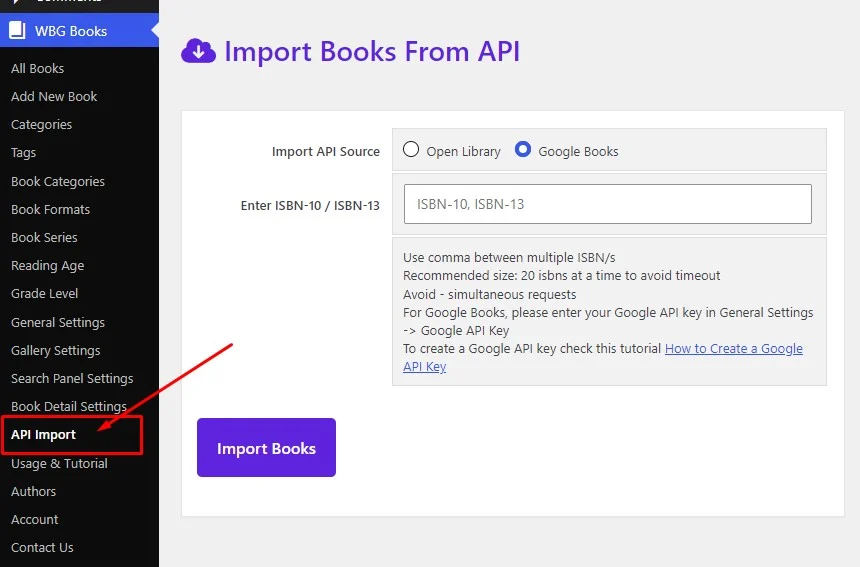
Step 1 – Go to WBG Books → API Import #
- Log in to your WordPress admin dashboard
- Click WBG Books in the left sidebar
- Click API Import from the submenu
Step 2 – Select Your Import Source #
- You will see two radio button options – Google Books and Open Library
- Select Google Books for the most comprehensive book database
- Select Open Library if you don’t have a Google API key or for classic titles
Using Google Books for the first time? #
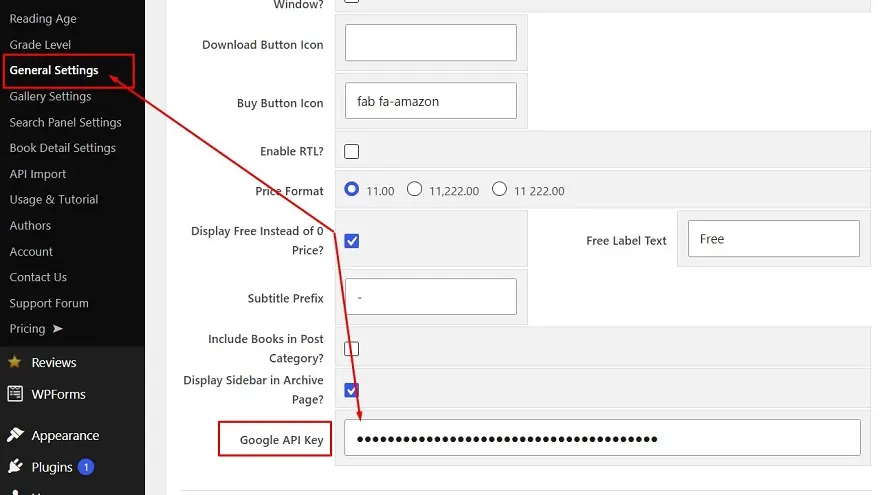
For Google Books, a Google Books API key is required to use the Google Books import feature. You can follow our step-by-step guide to create one for free:
📖 How to Create a Google Books API Key → books-gallery.com/docs/create-google-api-key/
💡 Once your API key is created, go to your WordPress admin → WBG Books → General Settings → Google API Key field and paste it there. You can then import any book instantly using just its ISBN number – no manual data entry required.
Step 3 – Enter Your ISBN Numbers #
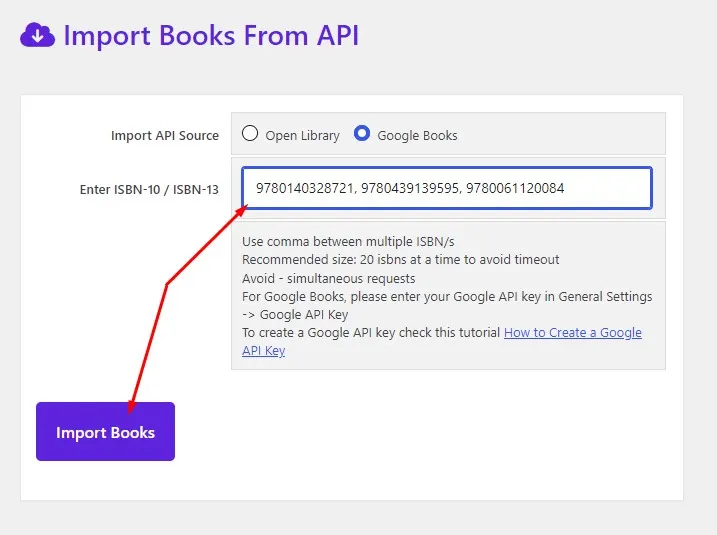
- Find the ISBN-10 or ISBN-13 number for your book – it’s printed on the back cover or copyright page
- Enter the ISBN number in the import field
- To import multiple books at once separate ISBNs with commas
- Recommended: import 20 books at a time maximum to avoid timeout errors
Example – importing multiple books at once:
9780857197689, 9780140328721, 9780061120084
Where to find ISBNs quickly:
Search for any book on Amazon or Google Books – the ISBN appears in the product details section. You can also scan physical book barcodes using a free barcode scanner app on your phone.
Step 4 – Click Import Books #
- Click the Import Books button
- Wait a few seconds while Books Gallery fetches the data from the API
- You will see a success message when the import completes
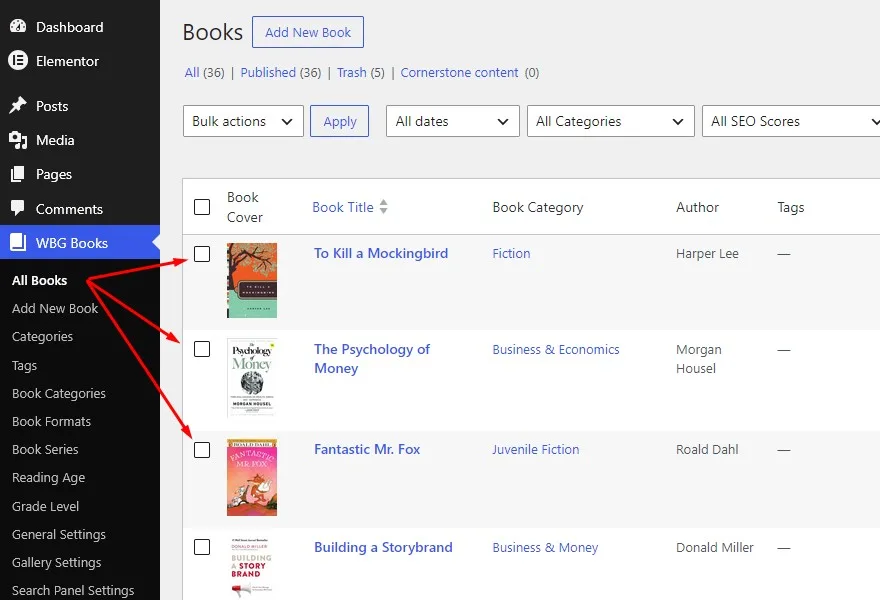
- The imported books appear immediately in WBG Books → All Books
Import completed successfully?
Go to WBG Books → All Books to see your newly imported books. Each book will have its title, author, cover image, description, publisher, and other metadata already filled in. You can then edit individual books to add affiliate links, pricing, or custom descriptions.
Step 5 – Verify Your Import is Working #
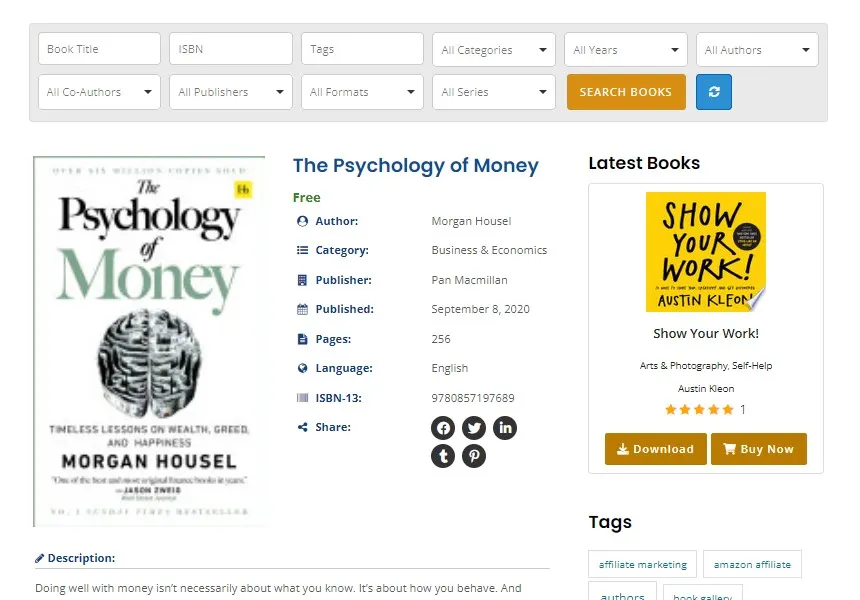
After importing, verify the books appear correctly on your gallery:
- Go to your book gallery page on the front end of your website
- Check that the newly imported books appear with their cover images
- Click on any book to open the detail popup and verify all metadata is correct
- If a book is missing cover image or description – try re-importing using the ISBN from Google Books directly

Test an ISBN in Browser #
If you find any ISBN not working you can check if that ISBN is available in the Google Books API server by testing it directly in your browser:
https://www.googleapis.com/books/v1/volumes?q=isbn:9780140328721&key=YOUR_API_KEY
Replace YOUR_API_KEY with your actual Google API key and 9780140328721 with the ISBN you want to test. If the ISBN is available you will see JSON data in your browser. If you see an error or empty result the book is not available in Google Books and you should try Open Library instead.
Common Problems and Solutions #
| Problem | Cause | Solution |
| Quota exceeded | Too many API requests | Enable billing in Google Cloud Console or wait 24 hours for quota to reset |
| API not enabled | Books API not turned on | Go to Google Cloud Console → API Library → Enable Books API |
| Key invalid | Wrong key copied | Go to Google Cloud Console → Credentials and copy the key again carefully |
| REQUEST_DENIED | API key restriction mismatch | Check your API key restrictions in Google Cloud Console – ensure your domain is added correctly |
| Empty result | ISBN not found in database | Try Open Library as alternative source, or add the book manually |
| Timeout error | Too many ISBNs at once | Import maximum 20 ISBNs at a time – split larger batches into multiple imports |
| Missing cover image | No image in Google Books database | Upload a cover image manually in WBG Books → Edit Book → Cover Image |
Best Practices for Large Catalog Imports #
- Import 20 ISBNs at a time maximum – larger batches may timeout
- Avoid running simultaneous imports – wait for one batch to complete before starting the next
- Use Google Books as primary source and Open Library as fallback for missing books
- After importing review each book and add your affiliate links and pricing information
- For very large catalogs (500+ books) consider using CSV bulk import instead – faster for existing data
- Keep a spreadsheet of your ISBNs organized by category before importing – makes catalog management easier
Frequently Asked Questions #
Do I need a Google API key to import books? #
You need a Google API key only if you use Google Books as your import source. If you select Open Library as the source, no API key is required. However Google Books has a much larger and more comprehensive database – we recommend getting a free Google API key for the best results.
How many books can I import at once? #
We recommend importing 20 books at a time maximum to avoid timeout errors. For larger catalogs simply split your ISBNs into batches of 20 and run multiple imports. There is no limit to the total number of books you can import – just the batch size per import.
What data gets imported automatically? #
Books Gallery automatically imports: book title, author name, cover image, description, publisher, publication date, ISBN-10 and ISBN-13, page count, language, reading age, and available book formats. You can then edit any book to add your affiliate links, pricing, custom descriptions, and categories.
What if a book isn’t found in Google Books? #
If an ISBN returns an empty result in Google Books, try the following: (1) Switch the import source to Open Library, (2) Verify the ISBN is correct by checking the book’s Amazon page or barcode, (3) Add the book manually using WBG Books → Add New Book and entering the details yourself.
Can I import books from Amazon directly? #
Books Gallery currently imports from Google Books and Open Library using ISBN numbers. Direct Amazon import is not available – however you can easily find ISBNs for Amazon books in their product details section and use those ISBNs to import via Google Books API.
Is the Google Books API free? #
Yes – the Google Books API is free to use with generous daily quotas. For most users the free tier is more than sufficient. If you are importing extremely large catalogs and hit quota limits, you can enable billing in Google Cloud Console to increase your daily limit significantly.
Related Documentation #
- How to Create a Google Books API Key → books-gallery.com/docs/create-google-api-key/
- Import Books From CSV → books-gallery.com/docs/import-books-from-csv/
- Add a New Book Manually → books-gallery.com/docs/add-a-new-book/
- Configure General Settings → books-gallery.com/docs/configure-the-settings/
Related Blog Articles #
Create a Digital Library in WordPress: books-gallery.com/how-to-create-digital-library-wordpress/
Build a WordPress Amazon Store: books-gallery.com/wordpress-amazon-store/
Create an Amazon Affiliate Book Store: books-gallery.com/amazon-affiliate-book-store-wordpress/
Need Help? #
If you are having trouble importing books via Google Books API, our support team is ready to help. Premium users get priority support – we typically respond within 24 hours on business days.
Support forum: wordpress.org/support/plugin/wp-books-gallery/
All documentation: books-gallery.com/docs/


