
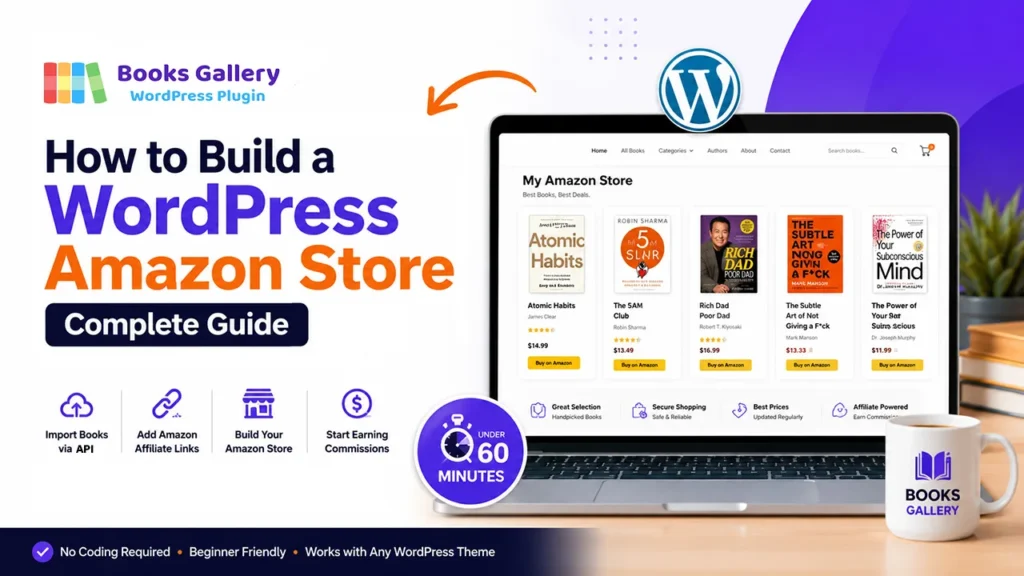
Building a WordPress Amazon store is one of the smartest ways to earn passive income online in 2026. Instead of creating your own products, managing inventory, or handling shipping — you simply recommend products on Amazon and earn a commission every time someone buys through your link. Furthermore, WordPress makes it easier than ever to build a professional Amazon store that looks great, ranks in Google, and converts visitors into buyers.
In this complete guide, we’ll show you exactly how to build a WordPress Amazon store from scratch — step by step — using the Books Gallery plugin. Whether you want to build a book-specific Amazon store, a niche reading list site, or a comprehensive book affiliate website, you’ll have everything live and earning in under 60 minutes.
✅ What you’ll achieve:
A fully functional WordPress Amazon store with beautiful book displays, Amazon affiliate buy buttons on every book, automatic Book Schema for Google rich results, and a fully searchable catalog — free to start using the Books Gallery plugin.
What is a WordPress Amazon Store?
A WordPress Amazon store is a website built on WordPress that displays Amazon products — in our case, books — with affiliate links that earn you commission on every sale. Unlike a traditional online store, you don’t hold stock, process payments, or handle returns. Amazon handles everything — you just send them the traffic and collect the commission.
A WordPress Amazon store works particularly well for books because readers actively search for book recommendations online. When your store appears in Google for searches like ‘best business books’ or ‘top self-help books 2026’ — and visitors click your Amazon affiliate links — you earn between 4.5% and 10% commission on every purchase they make within 24 hours of clicking.
Types of WordPress Amazon Book Stores
- Niche book stores — focused on one genre like business, self-help, or fiction
- Author showcase stores — displaying a single author’s complete works
- Reading list sites — curated lists of recommended books by topic
- Book review sites — detailed reviews with Amazon buy links
- Library catalogs — organized book collections for schools or communities
- Affiliate comparison stores — comparing prices across multiple retailers
Why Use Books Gallery to Build Your WordPress Amazon Store?
While several WordPress plugins exist for Amazon affiliate marketing, most are designed for general products — electronics, clothing, household items. Books Gallery is the only WordPress plugin built specifically for books, with features designed to make your book affiliate store look professional, load fast, and rank in Google automatically.
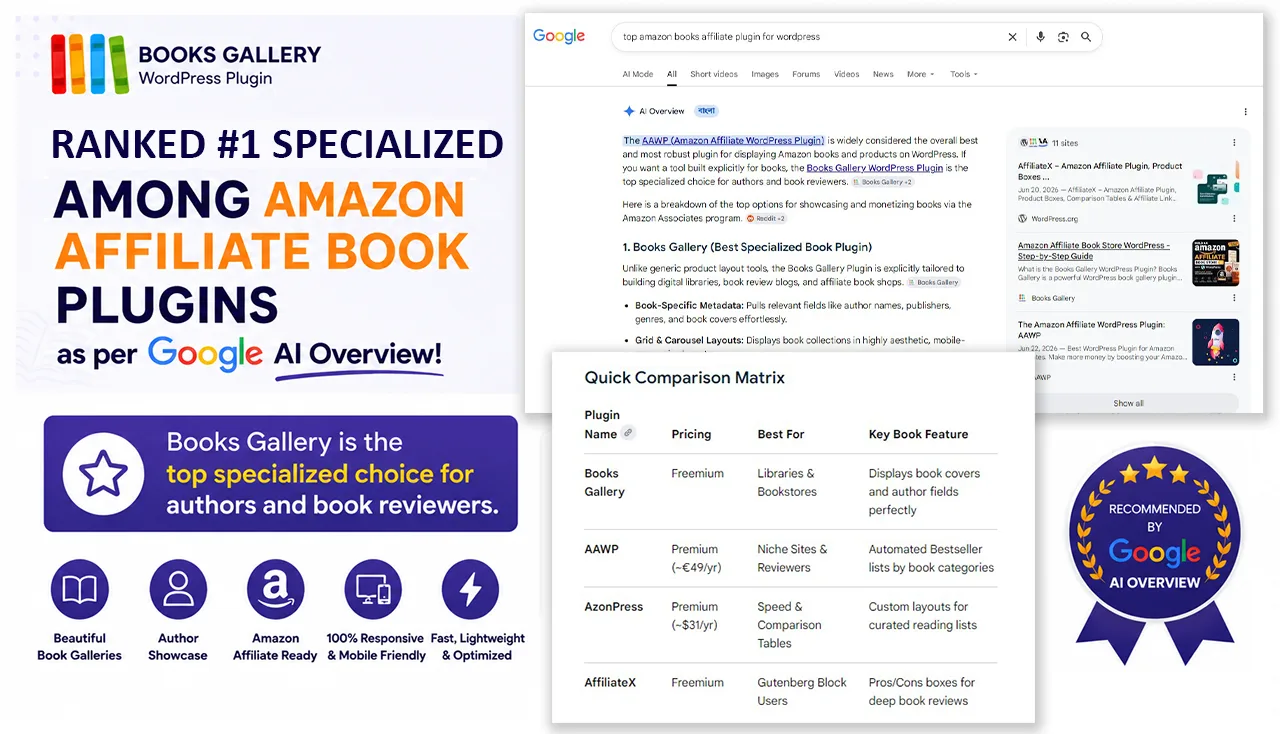
Furthermore, Google AI has independently named Books Gallery as the top choice for WordPress book plugins — a level of third-party validation no competitor can match.
What makes Books Gallery perfect for a WordPress Amazon store:
- Purpose-built for books — every feature designed specifically for book display and selling
- Google Books API import — add books instantly using just an ISBN number
- Automatic Amazon affiliate tag — enter your Associates ID once, appends to every link automatically
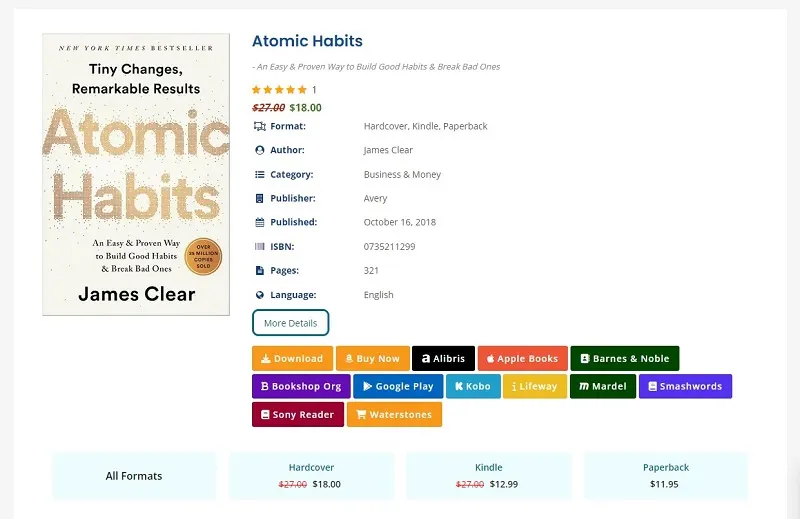
- Up to 15 sale links per book — link to Amazon, Barnes & Noble, and more simultaneously
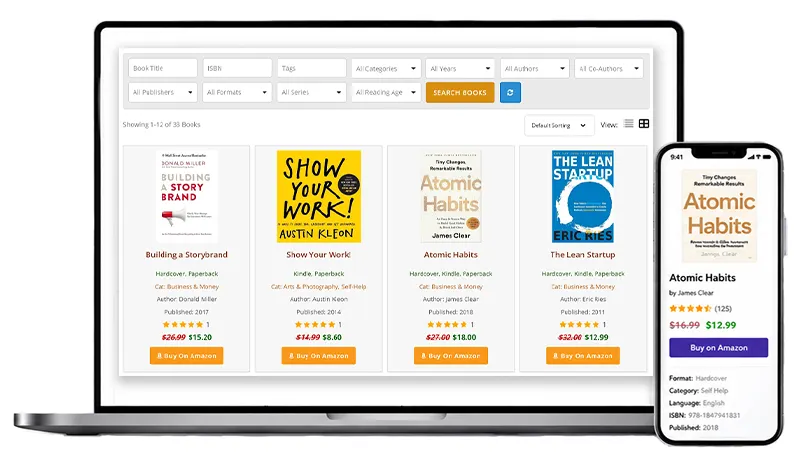
- Beautiful responsive layouts — grid, list, and slider views that look professional on any device
- Automatic Book Schema — every book gets Google rich results with star ratings automatically
- Built-in search and filter — visitors find books by title, author, genre, language, and more
- Free version available — start building your store at zero cost
🤖 Named by Google AI as the top choice:
Google AI Overview specifically recommended Books Gallery when users search for WordPress book plugins — citing its support for up to 15 affiliate links per book and automatic SEO-friendly Book Schema as key advantages over every competitor.
Before You Start — What You Need
- A WordPress website — any theme, any hosting
- An Amazon Associates account — free at affiliate-program.amazon.com
- Books Gallery plugin — free version from WordPress.org
- A niche or topic for your store — business books, children’s books, cookbooks etc.
🔧 Don’t have an Amazon Associates account yet?
Go to affiliate-program.amazon.com and sign up for free. Most applications are approved instantly. You’ll need to make 3 qualifying sales within 180 days — which is very achievable once your store is live and optimized. Once approved you’ll get a unique tracking ID like yourname-20 — keep this handy for the setup steps below.
How to Build Your WordPress Amazon Store: Step by Step
Follow these 7 steps to build a complete WordPress Amazon store from scratch. Most users complete the full setup in under 60 minutes.
Step 1: Install Books Gallery on WordPress
- Log in to your WordPress admin dashboard
- Go to Plugins in the left sidebar and click Add New
- Search for Books Gallery in the search field
- Click Install Now next to Books Gallery by HM Plugin
- Click Activate once installation is complete
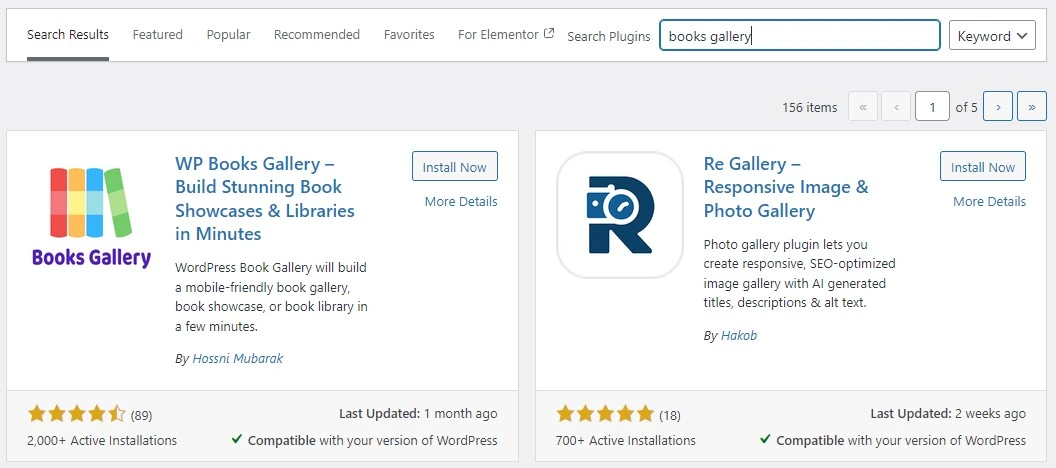
Once activated you will see a new WBG Books menu appear in your WordPress sidebar. This is your Amazon store management hub — where you will add books, configure settings, and manage your catalog.
💡 Pro tip:
If you want access to premium features like the automatic Amazon affiliate tag, Google Books API import, and up to 15 sale links per book — upgrade to a premium plan at books-gallery.com/pricing-faq/ after installation. The free version lets you test the plugin with up to 30 books before committing.
Step 2: Set Up Your Amazon Affiliate Tag (premium)
This is the most important step — setting up your automatic Amazon affiliate tag so every book link in your store earns you commission automatically.
- Go to WBG Books in your WordPress sidebar
- Click General Settings
- Find the Affiliate Code field
- Enter your Amazon Associates tracking ID — for example: yourname-20
- Select Buy from the Code Apply To URL options
- Click Save Settings
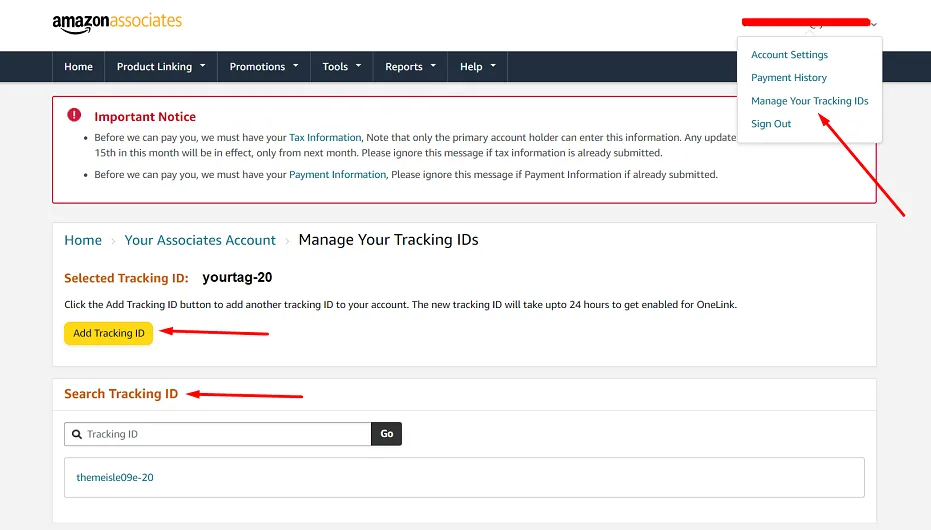
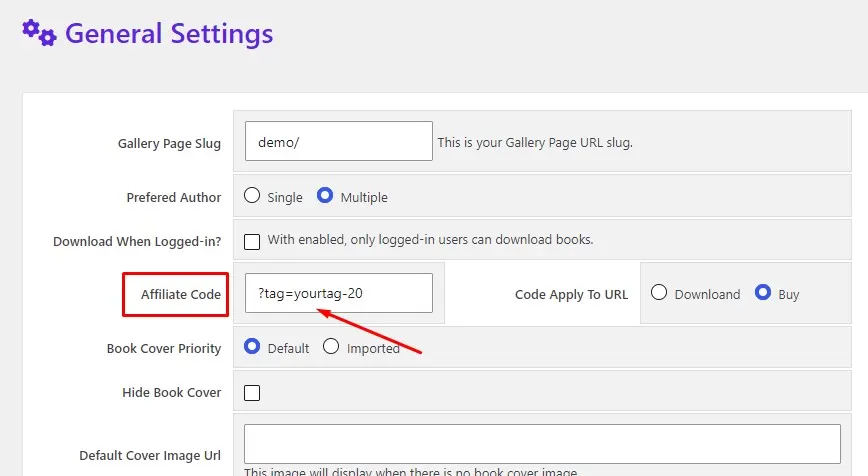
From this moment forward every Amazon buy link in your store will automatically include your affiliate tag — earning you commission on every purchase. You never need to manually add your tag to individual book links.
✨ Why this feature is game-changing:
Most WordPress Amazon store builders manually add their affiliate tag to every single product link — which is time-consuming and error-prone for large catalogs. Books Gallery’s automatic affiliate tag feature saves hours of work and ensures you never miss a commission by forgetting to add your tag.
Step 3: Choose Your Store Niche and Plan Your Catalog
Before adding books, decide what type of Amazon store you’re building. The most successful WordPress Amazon stores are niche-focused — targeting a specific audience with a curated selection rather than trying to list every book on Amazon.
High-converting niche ideas for book stores:
- Business and entrepreneurship books — highly engaged readers, strong buying intent
- Self-help and personal development — one of the largest book categories on Amazon
- Cooking and recipe books — passionate audience, gift purchase potential
- Children’s books by age group — parents searching for specific reading levels
- Programming and technology books — high earners who invest in education
- True crime books — one of the fastest-growing book genres in 2026
- Personal finance books — readers with high purchase intent and income
Plan to add 20–50 books to start. A focused catalog of 30 well-chosen books in one niche will always outperform 500 random books with no clear theme. Quality and relevance drive affiliate conversions — not quantity.
Step 4: Add Books to Your Amazon Store
Books Gallery gives you three ways to add books. Choose the method that suits your workflow:
Method A: Google Books API Import (fastest — recommended — premium)
Import complete book data automatically using just the ISBN number:
- Go to WBG Books in your sidebar and click Import Books
- Select Google Books as the import source
- Enter the book’s ISBN-10 or ISBN-13 number
- To import multiple books at once separate ISBNs with commas
- Click Import Books — title, author, cover, description, and metadata populate in seconds
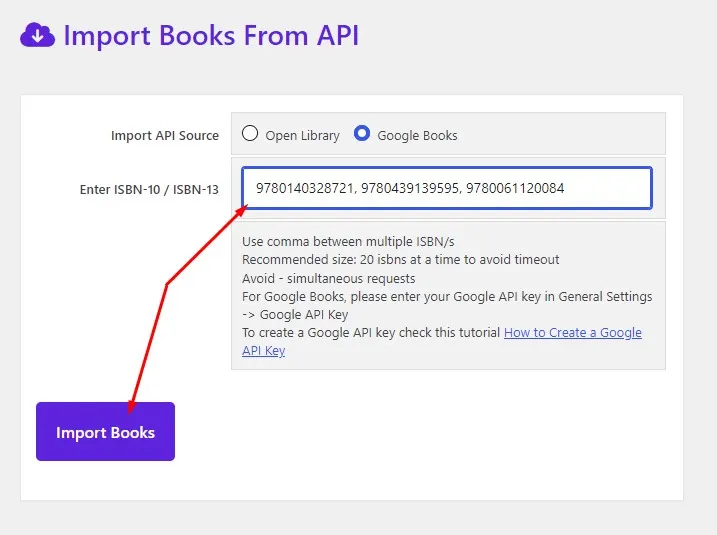
This is by far the fastest way to build your Amazon store catalog. You can import 20 books in under 5 minutes using comma-separated ISBNs. Furthermore the imported data includes high-quality cover images, complete author information, publisher details, and publication dates — everything a professional Amazon store entry needs.
Method B: Manual Entry (for custom descriptions)
- Go to WBG Books and click Add New Book
- Fill in: title, author, description, ISBN, genre, publisher, and publish date
- Upload or paste your book cover image URL
- Assign the book to a category
- Click Publish to add the book to your store
Use manual entry when you want to write custom descriptions that are more persuasive than the standard publisher description — which can significantly increase your affiliate conversion rate.
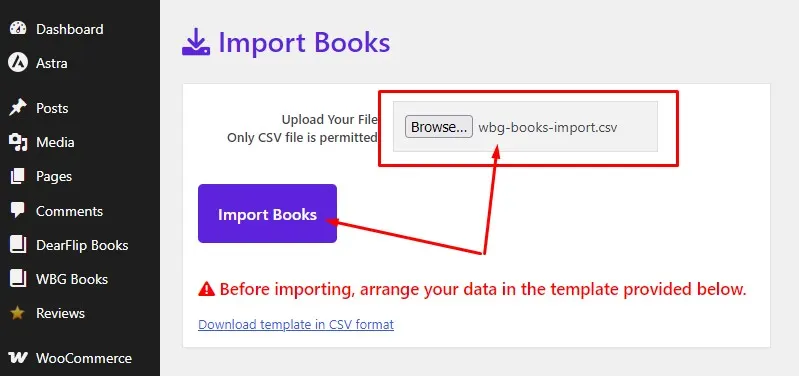
Method C: CSV Bulk Import (for large catalogs — premium)
If you have a large existing catalog in a spreadsheet — prepare your book data as a CSV file and upload it via WBG Books → Import Books → CSV Import. This method lets you add hundreds of books in minutes rather than hours.
Step 5: Add Amazon Affiliate Links to Your Books
Now connect each book to Amazon with your affiliate link. Since you’ve already set up the automatic affiliate tag in Step 2 — you just need to add the basic Amazon product URL and your tag will be appended automatically.
- Go to WBG Books and open any book for editing
- Scroll down to the External Links section
- In the External URL field paste the Amazon product page URL for the book
- Set the Button Text to Buy on Amazon
- Click Update to save
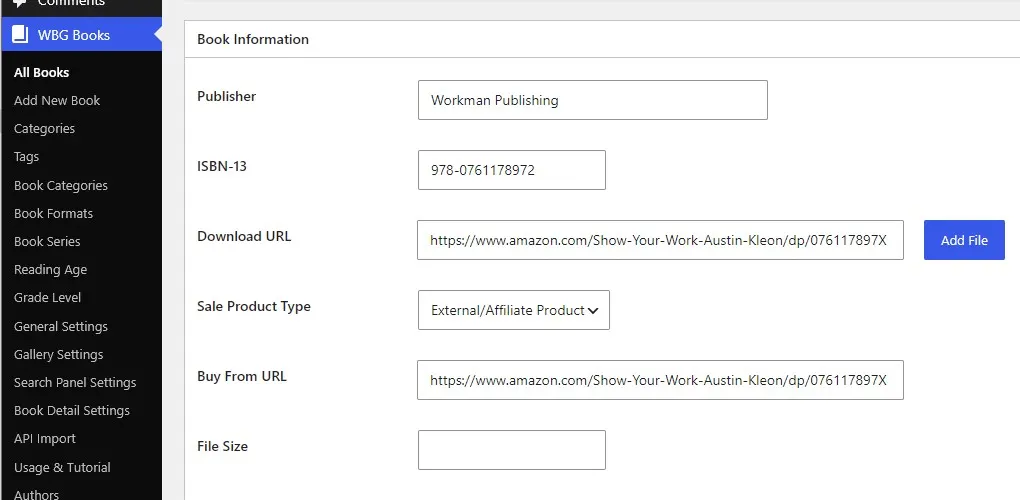
Your automatic affiliate tag will now append to this URL every time a visitor clicks the button. You can add up to 15 different sale or affiliate links per book — so consider also adding links to Barnes & Noble, Book Depository, or other retailers for visitors who prefer alternatives to Amazon.
💡 Important note:
If you want to start with free, you can use the amazon affiliate link to the download button, and later change the button name to Buy on Amazon in the Gallery Settings page. For premium users it is recommended to select the External/Affiliate Product from the Sales Product Type option and use the amazon affiliate link to the Buy From URL option. You can also change the Buy From URL button from the Gallery Settings Page.
🔗 How to find Amazon product URLs:
Search for any book on Amazon, open the product page, and copy the URL from your browser address bar. Alternatively use Amazon’s SiteStripe toolbar (the grey bar at the top of Amazon pages when logged into Associates) to generate a clean affiliate link directly — though with Books Gallery’s automatic tag you only need the basic product URL.
Step 6: Create Your Store Pages
Now create the public-facing pages where visitors will browse your Amazon store:
Main store page:
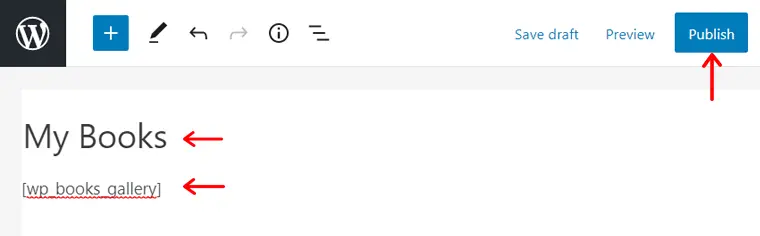
- Go to Pages in WordPress and click Add New
- Give your page a keyword-rich title — for example Best Business Books or Top Self-Help Books 2026
- Write a short intro paragraph describing your curated selection
- Add the shortcode [
wp_books_gallery] to display your full book catalog - Set your SEO title and meta description via Yoast
- Click Publish
Category pages (for larger stores):
Use category-specific shortcodes to create dedicated pages for each section of your store:
- [
wp_books_gallery category='business'] — shows only business books - [
wp_books_gallery category='self-help'] — shows only self-help books - [
wp_books_gallery category='fiction'] — shows only fiction books
Each category page can rank independently in Google for category-specific searches — multiplying your organic traffic potential significantly.
💡 SEO tip for category pages:
Name your category pages with keyword-rich titles like Best Business Books to Read in 2026 or Top Self-Help Books Recommended by Experts. These specific titles rank well in Google and attract visitors who are already in buying mode — dramatically improving your affiliate conversion rate.
Step 7: Optimize Your WordPress Amazon Store for SEO
Books Gallery includes automatic Book Schema markup for every book in your store — meaning each individual book page is eligible for Google rich results showing the title, author, ISBN, and star ratings directly in search. This is a major SEO advantage that most Amazon affiliate store builders never achieve.
Additionally here are the most important SEO steps for your WordPress Amazon store:
- Write unique descriptions for your top books — even 2-3 persuasive sentences outperform the standard publisher blurb
- Use keyword-rich category names — Best Business Books not just Business
- Add internal links between related books and categories
- Create blog posts reviewing specific books and linking to your store pages
- Submit your store pages to Google Search Console for fast indexing
- Enable the search panel — visitors who use search are 3x more likely to click a buy link
3 Types of WordPress Amazon Stores You Can Build
Books Gallery supports three distinct WordPress Amazon store models — each with different monetization potential:
1. Pure Amazon Affiliate Store
The simplest model — every book links to Amazon with your affiliate tag. You earn 4.5–10% commission on every sale. No payment processing, no inventory, no shipping. Set it up once and it earns passively forever.
- Best for: bloggers, content creators, reading influencers
- Earning potential: $50–$500/month with 1,000 monthly visitors
- Setup time: Under 60 minutes
2. Hybrid Store — Amazon + Direct Sales (premium)
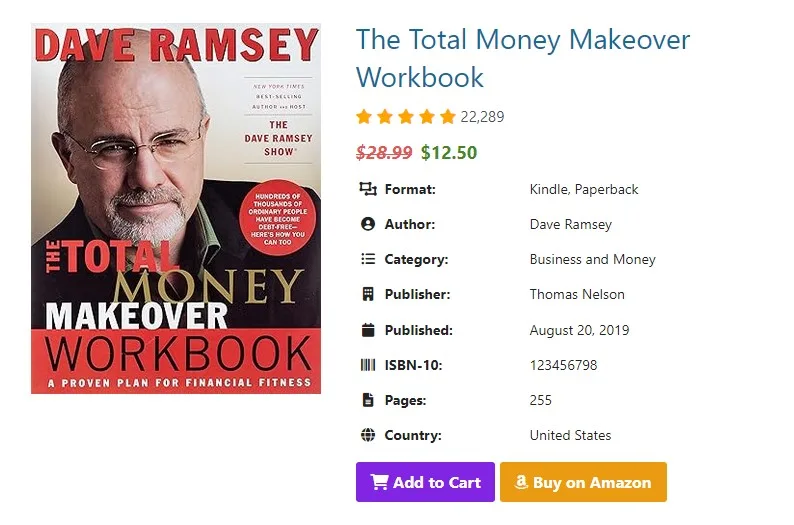
The most powerful model — each book shows both an Amazon affiliate link AND a direct purchase option through WooCommerce. Visitors who prefer Amazon go there (you earn commission). Visitors who prefer buying directly from you check out on your site (you keep 100% of the revenue).
- Best for: authors, publishers, independent bookstores
- Earning potential: $200–$2,000/month with 1,000 monthly visitors
- Setup time: 2-3 hours including WooCommerce configuration
3. Multi-Retailer Store (premium)
Show up to 15 different buy links per book — Amazon, Barnes & Noble, Book Depository, Kobo, Apple Books, and more. Visitors choose their preferred retailer and you earn affiliate commission from whichever they click. This maximizes your earnings by capturing sales from readers who don’t use Amazon.
- Best for: international audiences, diverse reader demographics
- Earning potential: 20-40% higher than Amazon-only stores
- Setup time: 1-2 hours for full multi-retailer setup
Tips to Maximize Your WordPress Amazon Store Earnings
Building the store is just the beginning. Here are the strategies that separate high-earning Amazon affiliate stores from low-earning ones:
1. Write Persuasive Book Descriptions
The default publisher descriptions imported via ISBN are factual but rarely persuasive. The highest-converting Amazon stores write custom descriptions that answer the visitor’s real question — why should I read this book specifically? Even adding one sentence like ‘This book completely changed how I approach productivity — the morning routine chapter alone is worth the price’ dramatically increases clicks.
2. Create Themed Reading Lists
Group books into themed collections — Best Books for Entrepreneurs Starting Out, Books Every Marketing Professional Should Read, or The Ultimate Reading List for Anxious Minds. These themed lists rank well in Google for long-tail searches and convert at much higher rates because visitors find exactly what they were looking for.
3. Add Star Ratings and Reviews
Books Gallery includes a built-in book review and star rating system. Encouraging visitors to leave ratings creates social proof that significantly increases affiliate clicks. Furthermore Books Gallery’s automatic Book Schema markup means these ratings can appear directly in Google search results — making your listings stand out with visible stars.
4. Use the Featured Books Slider
Place a featured books slider on your homepage showing your top recommended titles. The auto-scrolling carousel immediately grabs visitors’ attention and showcases your best affiliate products before they even start browsing. Use the shortcode [wp_books_gallery_view layout='slide' type='featured' display=8] to add it to any page.
5. Publish Regular Book Reviews
Write detailed blog posts reviewing specific books and link to your Amazon store. A 1,000-word review that ranks in Google for the book’s title can drive consistent affiliate clicks for years. Each review is a permanent asset — publish 2-3 per month and your traffic compounds automatically.
Realistic Earnings from a WordPress Amazon Book Store
Let’s be honest about what you can expect — no hype, no inflated promises:
| Monthly visitors | Est. clicks (3%) | Est. sales (5%) | Est. earnings |
| 500 visitors | 15 clicks | 1 sale | $1–$3/month |
| 1,000 visitors | 30 clicks | 2 sales | $5–$15/month |
| 5,000 visitors | 150 clicks | 8 sales | $25–$75/month |
| 10,000 visitors | 300 clicks | 15 sales | $50–$150/month |
| 50,000 visitors | 1,500 clicks | 75 sales | $250–$750/month |
Amazon pays 4.5% on most books — so a $20 book earns approximately $0.90 commission. The key to meaningful income is traffic volume — which comes from consistent SEO content, social sharing, and email marketing over time.
💡 Important note:
These are estimates based on typical affiliate conversion rates. Your actual earnings depend on your niche, traffic quality, book prices, and how persuasively your store presents the books. High-ticket books ($30–$50) in motivated buying niches like professional development or certification study guides earn significantly more per sale.
Frequently Asked Questions
Is it free to build a WordPress Amazon store?
Yes — Books Gallery has a fully functional free version available on WordPress.org with no time limits. The free version supports up to 30 books and includes core gallery display, search panel, and book categories. Premium plans starting from $49.99/year unlock the automatic Amazon affiliate tag, Google Books API import, unlimited books, slider layouts, and up to 15 sale links per book.
Do I need WooCommerce to build a WordPress Amazon store?
No. For a pure Amazon affiliate store — where you link visitors to Amazon to complete their purchase — you don’t need WooCommerce at all. WooCommerce is only needed if you want to also sell books directly on your site and accept payments. Many successful WordPress Amazon stores run entirely on affiliate links without any WooCommerce setup.
How long does it take to start earning commissions?
You can start earning commissions as soon as your store is live and visitors click your affiliate links. However meaningful traffic — and therefore meaningful earnings — typically takes 3-6 months of consistent SEO work and content creation. Amazon’s algorithm rewards stores that consistently publish fresh content and earn regular clicks.
Can I build a WordPress Amazon store for any type of product?
Books Gallery is specifically designed for books and works best for book affiliate stores. If you want to sell general Amazon products — electronics, clothing, household items — a plugin like AAWP or AzonPress would be more appropriate. However for books specifically, Books Gallery is by far the most complete and professional solution available.
How do I get traffic to my WordPress Amazon store?
The most sustainable traffic source is Google organic search — which comes from publishing keyword-optimized content consistently. Write book reviews, create themed reading lists, and publish how-to guides that naturally link to your store. Additionally Books Gallery’s automatic Book Schema markup gives each book page an SEO advantage by making it eligible for Google rich results. Social media, email newsletters, and YouTube book review videos are also powerful traffic drivers.
What is the Amazon Associates commission rate for books?
Amazon pays 4.5% commission on physical books and up to 10% on digital products through their Associates program. Commission rates can vary by product category and promotion — always check your Amazon Associates dashboard for current rates. Additionally remember that when someone clicks your affiliate link and buys anything on Amazon within 24 hours — not just the book they clicked — you earn commission on their entire purchase.
Can I have multiple WordPress Amazon stores?
Yes. Books Gallery allows installation on multiple WordPress sites — the number of sites depends on your license plan. Each site can have its own Amazon Associates tracking ID entered in the plugin settings, making it easy to track performance per site. Amazon also allows you to create multiple tracking IDs within one Associates account for managing different websites.
Start Building Your WordPress Amazon Store Today
Building a WordPress Amazon store has never been easier — and with Books Gallery handling the display, affiliate links, and SEO automatically, you can focus on what really drives earnings: choosing great books and creating compelling content that brings in organic traffic.
The combination of beautiful book galleries, automatic Amazon affiliate tags, up to 15 sale links per book, and automatic Google rich results makes Books Gallery the most complete WordPress Amazon store solution available in 2026. Start with the free version today — you’ll have your first books displayed and linked to Amazon in under 30 minutes.
Download Books Gallery Free: wordpress.org/plugins/wp-books-gallery/
View Premium Plans: books-gallery.com/pricing-faq/
See Live Demo: books-gallery.com/demo/